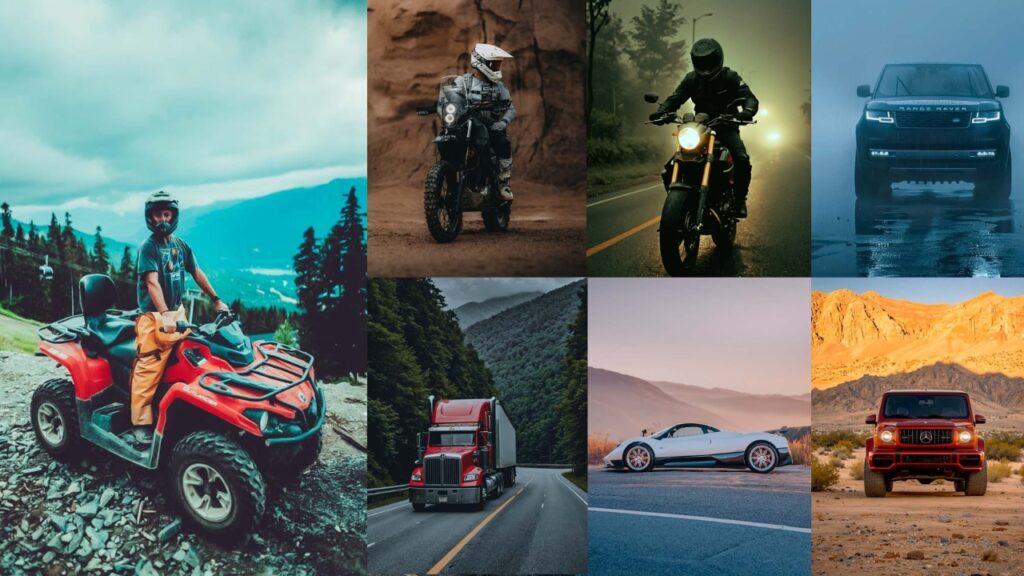
Automotive photography is unforgiving. Glare on a hood, a washed-out sky, flat paint in midday sun, one exposure mistake, and the whole shot falls apart. A well-chosen preset can fix those problems in seconds and give your car photos a consistent, professional look that stands out in a crowded feed.
This post provides selected automotive presets for 10 shooting styles: urban, cinematic, matte, vintage, HDR, night photography, and more. Every preset is available in both XMP and DNG format, free to download with no email required.

Pauline Jackson
My goal is to give photographers a starting point that already feels 80% complete, so they can focus on the final creative touch rather than fixing basic issues from scratch.
50 Automotive Lightroom Presets Free Download
The presets below are organized by shooting environment and mood. Use them as-is for a quick edit, or treat them as a starting point and fine-tune Exposure and White Balance to match your specific light conditions. Presets are one-click shortcuts. The final 20% of the edit is always yours.
Check out the Presets Settings and Installing Guide: How to install Presets→
1. City and Urban Presets
Urban environments throw a mix of hard shadows, artificial light, and reflective surfaces at your car. These presets are tuned for exactly that: punchy contrast to carve out city edges, a slight saturation lift to make paint bold under neon and sodium street lamps, and a targeted vignette to keep the eye on the vehicle rather than the background.


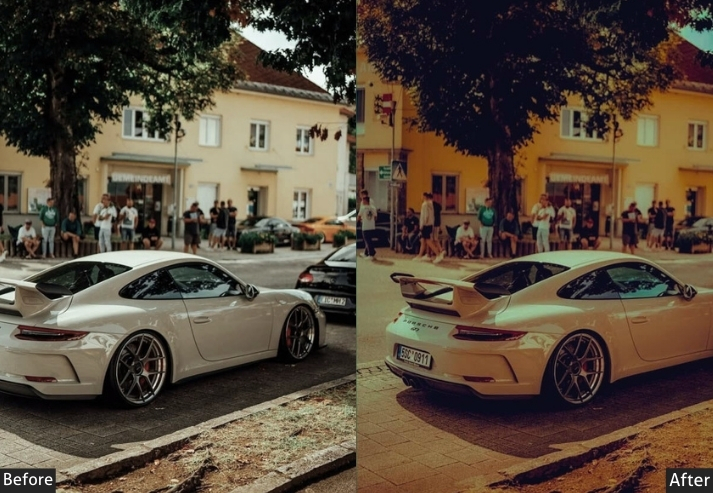

Light Panel: Exposure +10 | Contrast +20.
Color Panel: Saturation +15 | Vibrance +10.
Effects Panel: Vignette −5 | Clarity +15.
Detail Panel: Sharpening +20 | Noise Reduction −10.
- Purpose: an urban legend, ready for a photoshoot in the heart of the city.
- Best For: Snaps taken downtown, surrounded by glass and steel.
- Usage: tweak exposure if the streetlights are playing tricks.
- Style: Sharp, modern, with a touch of street swagger.
2. Minimal and Clean Presets
Sometimes the car’s design says everything: clean lines, a single color, perfect proportions. Minimal presets work by getting out of the way: softened contrast, slightly cooled tones, and a restrained vignette let the vehicle’s geometry speak without visual noise.


Light Panel: Exposure +5 | Contrast −10.
Color Panel: Saturation −10 | Temperature −5.
Effects Panel: Vignette −3 | Clarity +10.
Detail Panel: Sharpening +15 | Noise Reduction −5.
- Purpose: a minimalist art gallery.
- Best For: Studio shots or pics with a plain backdrop.
- Usage: play with exposure to avoid overcooking the brightness.
- Style: Quietly confident, sleek, and timeless.
3. Matte Look Presets
The matte aesthetic is one of the most requested looks in automotive photography right now and for good reason. Pulling saturation back, lifting blacks slightly, and reducing clarity creates a flat, velvety finish that mirrors the look of a satin or matte paint wrap. These presets dial that in without making the photo look faded or muddy.


Light Panel: Exposure −10 | Contrast +15.
Color Panel: Saturation −20 | Temperature +5.
Effects Panel: Vignette −10 | Clarity −10.
Detail Panel: Sharpening +10 | Noise Reduction −5.
- Purpose: latest matte trend, super chic!
- Best For: Cars with flat finishes or anyone craving a unique, modern twist.
- Usage: adjust exposure so it doesn’t get too shadowy.
- Style: Cool, understated, and effortlessly stylish.
4. Cinematic Presets
Cinematic presets borrow their aesthetic from film color grading: deep shadows, crushed blacks, lifted midtones, and a slight color shift toward teal or orange, depending on the variant. The result is a photo that looks like it belongs in a motion picture rather than a photo album. These work especially well for wide-angle shots where the environment is part of the story.

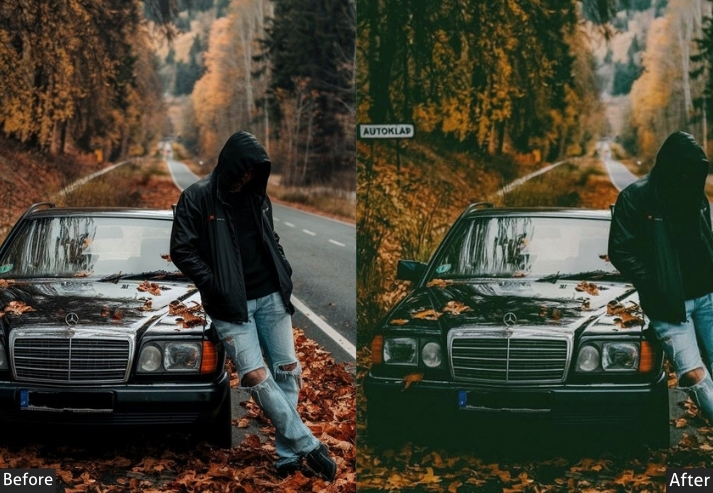

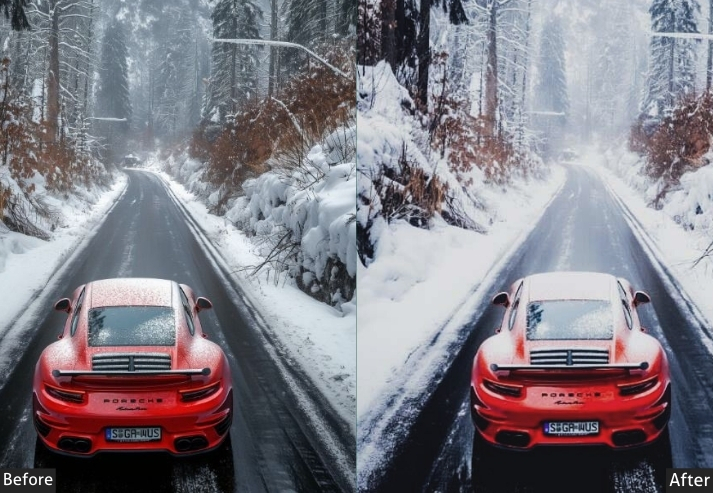
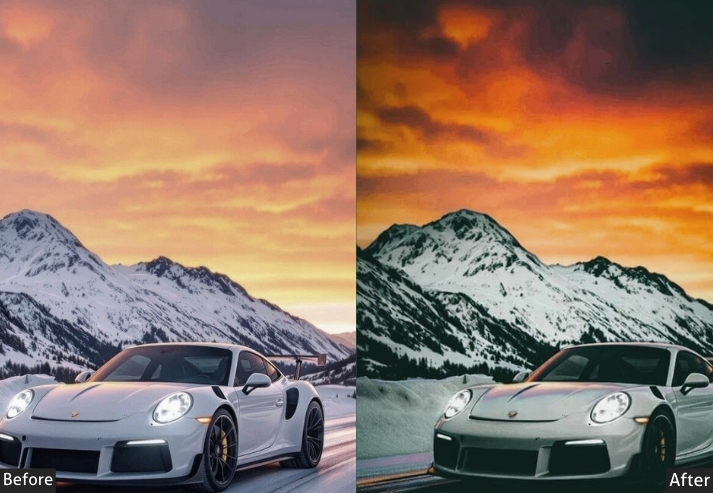


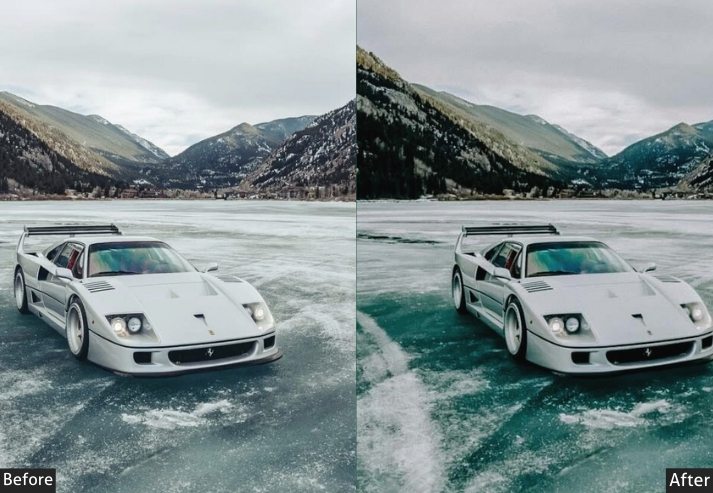

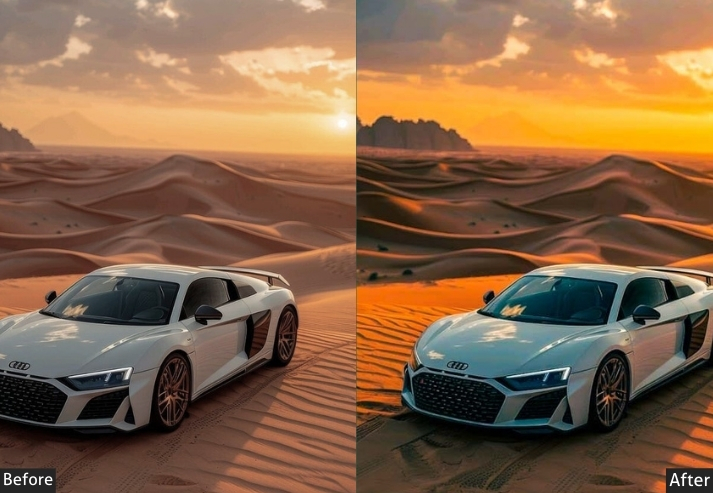
Light Panel: Exposure −15 | Contrast +25.
Color Panel: Saturation +10 | Temperature −10.
Effects Panel: Vignette −15 | Clarity +20.
Detail Panel: Sharpening +25 | Noise Reduction −10.
- Purpose: the lead of a Hollywood chase scene.
- Best For: Action shots or pics with wild lighting.
- Usage: fine-tune exposure to keep your star in the spotlight.
- Style: Big, bold, and straight-up cinematic.
5. Vintage and Retro Presets
Vintage presets are particularly effective on classic and muscle cars from the 1950s–80s because the processing matches the era. Faded blacks, warm amber tones, gentle grain, and reduced saturation recreate the look of a printed photograph from that period. On modern cars, the same presets create an interesting contrast: new machine, old soul.

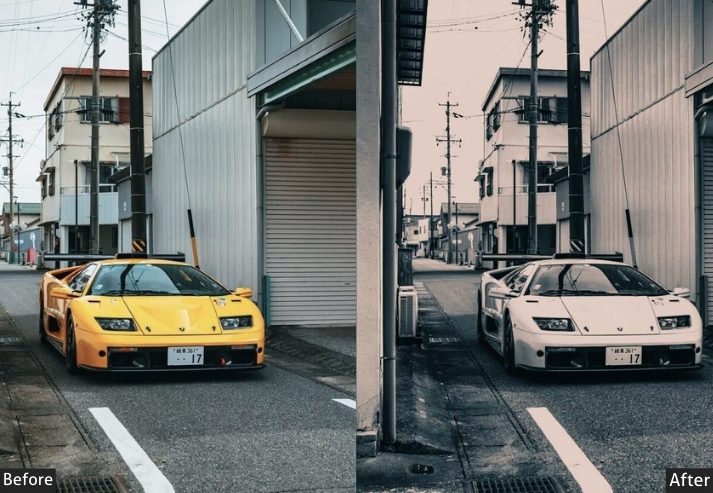
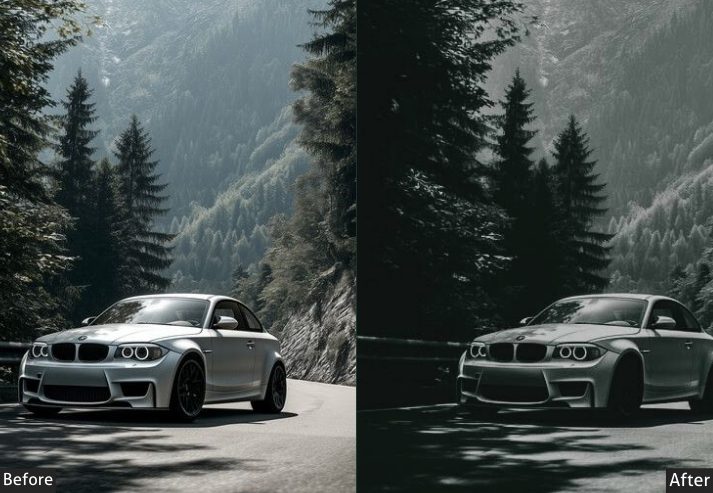


Light Panel: Exposure −10 | Contrast −15.
Color Panel: Saturation −20 | Temperature +10.
Effects Panel: Vignette −5 | Grain +10.
Detail Panel: Sharpening +10 | Noise Reduction −5.
- Purpose: a blast-from-the-past vibe.
- Best For: Classic cars or any ride needing a dose of nostalgia.
- Usage: tweak exposure to avoid losing your car in the haze.
- Style: Warm, worn, and full of vintage soul.
6. HDR Effect Presets
HDR processing expands the visible tonal range of an image so that detail is preserved in both highlights and deep shadows simultaneously, something a single exposure can’t always capture. In automotive photography, that means you keep texture in a dark wheel arch while still retaining cloud detail in a bright sky. These presets simulate that multi-exposure look from a single raw file.


Light Panel: Exposure +10 | Contrast +20.
Color Panel: Saturation +15 | Vibrance +10.
Effects Panel: Clarity +20 | Vignette −5.
Detail Panel: Sharpening +25 | Noise Reduction −10.
- Purpose: Highlights every inch of your car in hyper-realistic glory.
- Best For: Rides with intricate details or wild paint jobs.
- Usage: adjust exposure to keep it from glowing too hard.
- Style: Vivid, detailed, and larger-than-life.
7. Black and White Presets
Removing color forces the viewer to focus entirely on form, light, and shadow, and few subjects benefit from that as much as a well-designed car. The curves of a fender, the geometry of a grille, the reflections in a windshield: all of these read more clearly in black and white. Use the B&W Mix panel in Lightroom after applying to fine-tune how individual color channels (red, orange, yellow) map to luminosity values.


Light Panel: Exposure +10 | Contrast +20.
Color Panel: Black & White | B&W Mix adjusted to emphasize car lines.
Effects Panel: Vignette −5 | Clarity +15.
Detail Panel: Sharpening +20 | Noise Reduction −10.
- Purpose: classic.
- Best For: Rides with killer shapes or dramatic compositions.
- Usage: play with exposure for the perfect balance.
- Style: Stark, elegant, and forever cool.
8. Off-Road and Adventure Presets
Off-road and trail photography has different demands than studio or urban work. You’re dealing with natural light, earthy tones: greens, browns, ochres, and a subject that’s meant to look tough rather than pristine. These presets lift the greens and amber tones in the environment, increase micro-contrast to bring out mud splatter and tire tread, and add a warm cast that suits golden-hour trail conditions.


Light Panel: Exposure +10 | Contrast +20.
Color Panel: Saturation +15 | Temperature +5.
Effects Panel: Clarity +20 | Vignette −5.
Detail Panel: Sharpening +25 | Noise Reduction −10.
- Purpose: Shows off your car’s tough, adventurous spirit.
- Best For: Shots in the wild: trails, forests, or mountains.
- Usage: tweak exposure to match the sunlight or shade.
- Style: Rough, real, and ready for anything.
9. Luxury and High-End Presets
Luxury vehicle photography has a specific visual language: clean reflections, rich, deep colors, precise highlight control so chrome and glass don’t blow out, and an overall refinement that communicates quality. These presets target that aesthetic. They’re calibrated for glossy paint, polished wheels, and the kind of light you find at dawn or dusk when the sky is even and directional.


Light Panel: Exposure +10 | Contrast +20.
Color Panel: Saturation +15 | Temperature −5.
Effects Panel: Vignette −5 | Clarity +15.
Detail Panel: Sharpening +20 | Noise Reduction −10Light Panel: Exposure +10 | Contrast +20.
Color Panel: Saturation +15 | Temperature −5.
Effects Panel: Vignette −5 | Clarity +15.
Detail Panel: Sharpening +20 | Noise Reduction −10.
- Purpose: Makes your car look like it’s parked outside a mansion.
- Best For: High-end rides or fancy photo sessions.
- Usage: adjust exposure to keep it glossy, not glaring.
- Style: Ritzy, refined, and totally upscale.
10. Night Photography Presets
Night automotive photography is technically the most demanding of the ten styles here. You’re balancing artificial light sources: sodium, LED, neon, against deep shadow, often with high ISO noise to manage. These presets start with a darker base exposure, boost contrast to separate light pools from shadowed areas, and add a cool color shift that works with the natural blue hour or artificial lighting most night shoots involve.

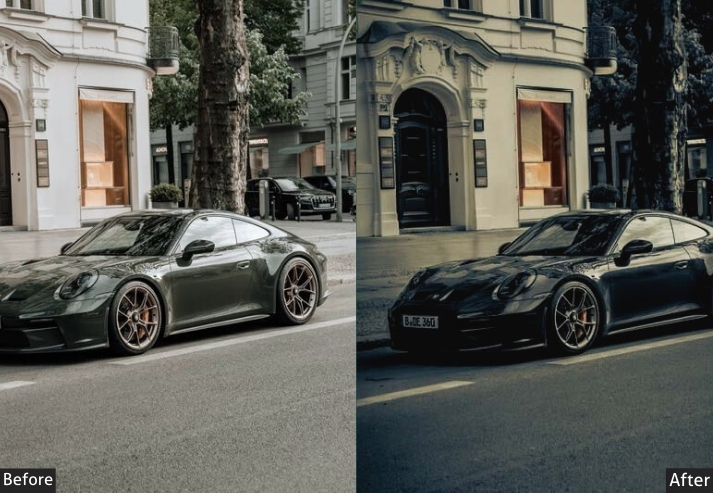


Light Panel: Exposure −10 | Contrast +20.
Color Panel: Saturation +10 | Temperature −10.
Effects Panel: Vignette −15 | Clarity +20.
Detail Panel: Sharpening +25 | Noise Reduction −10.
- Purpose: Turns your car into a nighttime icon, full of intrigue.
- Best For: Low-light pics: city streets or starry skies.
- Usage: tweak exposure so your car doesn’t vanish into the dark.
- Style: Dark, dreamy, and downright captivating.
Few Words
Fifty presets across ten distinct styles give you a strong toolkit for nearly every automotive shooting scenario, from gritty urban environments and nighttime streets to off-road trails and polished showroom floors. The key is to experiment: apply a preset, check how it interacts with your specific photo, and make small targeted adjustments rather than rebuilding the edit from scratch.
Have a question about a specific preset or a car photo you’re trying to edit? Drop it in the comments below. We read and respond to everyone.
More Presets:
Sports Lightroom Presets Free Download
Concert Photography Presets Free Download